
The short answer
Burn-in, also called an aging or run-in test, is a step where finished dash cams are powered and made to record continuously for a set period before they are packed. Units that have a weak solder joint, a faulty memory chip, a marginal power circuit or a firmware crash tend to fail early in this run, so the test screens them out. The duration, the room temperature and the percentage of units tested are set per program and confirmed in writing; this note does not give fixed hours because they differ by model and customer. What it explains is why the step exists, what it can and cannot catch, and how to read a factory's answer.
Why early failure is a real pattern
Electronic failures often follow a curve with a high rate in the first period of use, a long calm stretch, and a rise again at end of life. The first part comes from manufacturing defects that only appear under power and heat: cracked joints, contaminated pads, damaged parts, slightly out-of-tolerance components. A dash cam is exposed to extra stress because it records constantly, writes to a memory card without pause, and sits behind glass in the sun. Without a run-in step these early failures reach customers as dead-on-arrival units, which are the most expensive kind for a reseller: refund, shipping back and a bad review in a single event.
What a burn-in station looks like
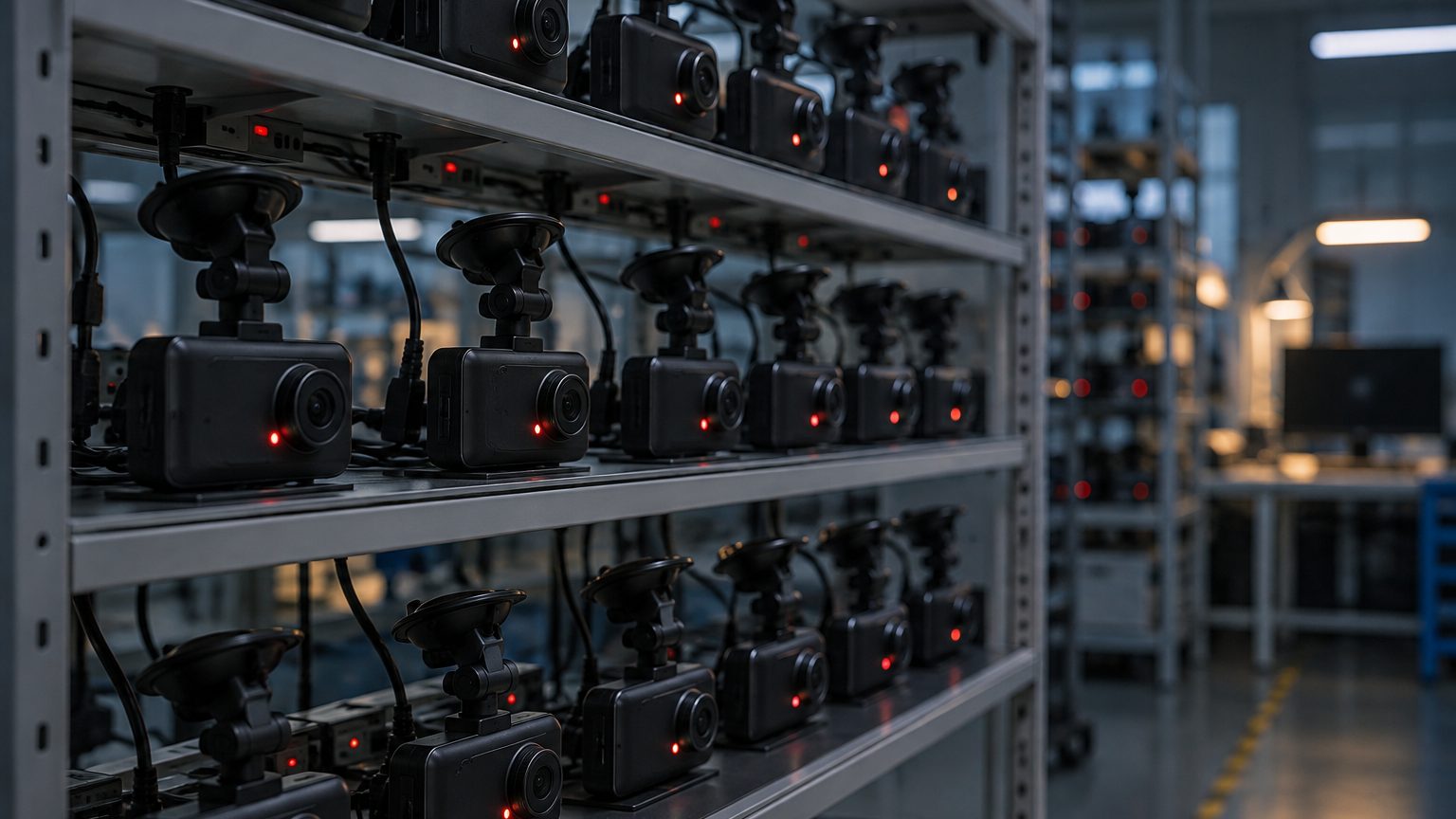
A typical station has racks or shelves with power supplies, a card in every unit, and a monitor or indicator to see whether each unit is still recording. Units are set to record in loop mode so the card is written continuously. Some factories run the test at room temperature, others in a warm room or chamber. At the end of the run, an operator or a script checks that each unit is still running, that the recorded files exist and play back, and that no restarts occurred. Failures are separated, logged and either repaired or scrapped.
| Item | Typical practice | Confirmed per program |
|---|---|---|
| Run mode | Continuous loop recording with a card inserted | Yes |
| Duration | Set by the factory and customer | Written in the program sheet |
| Temperature | Room temperature or warmed room | Yes |
| Share of units | All units, or a defined sample | Yes |
| Pass check | Still recording, files playable, no reboots | Yes |
| Failure handling | Separate, log, repair or scrap | Yes |
Burn-in is not the same as temperature testing
The two tests answer different questions. Burn-in asks whether a unit survives running for a while. Temperature testing, done on samples per program, asks whether it survives heat and cold, including startup and recording at the extremes. A factory can have one without the other, so ask about both. For a hot-climate program, a sample run at high temperature followed by a sharpness and recording check is a useful addition; see dash cam heat resistance and supercapacitor versus battery for why the power buffer matters in that test.
What burn-in cannot catch
A run-in test finds problems that show quickly. It will not reveal a lens that drifts after months, a housing that yellows, a memory card that wears out, or a firmware bug that appears only with a certain card brand or a particular GPS sequence. It also depends on the test setup: if the units run on a bench supply with perfect voltage, they do not see the dips and spikes of a real car. That is why burn-in is one layer among several, alongside the functional test described in functional testing, firmware checks in firmware quality, and pre-shipment sampling in quality inspection.
Reading the numbers a factory reports
When you ask for burn-in results, the useful answer has shape: how many units ran, how many failed, and what the failures were. A report that says "burn-in passed" without counts tells you little, because a run where nothing failed and a run where one unit in fifty failed are both "passed". Failure type matters too. Units that die early point at solder or component problems on the SMT side. Units that freeze or lose files point at firmware or memory. Units that shut down from heat point at power design or housing. Each pattern sends you to a different section of the route, which is why the desk asks for the failure breakdown rather than a single pass or fail. Keep the reports per batch; over several orders they become a trend line that shows whether a factory is stable or drifting, and they are the reference if a field problem later needs a root-cause discussion.
Cost and time trade-off
Burn-in takes space, power and time, and the factory carries that cost. A factory that skips it or shortens it can look faster, and that is a trade-off buyers should understand rather than assume. For a low-volume stock model, a sample-based run may be reasonable. For a fleet or insurer program where a dead unit has an installer visit attached, running every unit is more sensible. Write the choice into the program sheet so both sides know what was agreed, and so any later dispute about early failures has a clear reference. Do not expect a factory to extend the run at no cost; a longer run affects lead time and is part of the discussion, covered on MOQ and lead time.
What to ask and what to receive
- Is burn-in done on every unit or on a sample?
- How long is the run, and at what temperature? Get the number in writing for your program.
- What counts as a fail? Reboot, file error, dropped GPS, overheating.
- How many units failed in the last batches? A factory that records this can answer; one that does not record it cannot manage it.
- Are the cards used in burn-in the same type as the bundled ones? Mismatched cards hide compatibility problems.
The desk asks these questions during factory selection and reflects the answers on the quality control and production process pages. If you have a program with special run-in needs, such as extended heat, send the details through the quote form and they will be written into the quotation.